
Property inspections · unit turnovers · work orders
Property inspection app you can talk through
Walk a unit or a property and say what you see. Report6 builds the property inspection report, with photos, findings and follow-ups, on your iPhone or Android phone.


Available now on the App Store and Google Play · No checklist to fill out
Property inspections without the clipboard
Property managers and maintenance teams walk a lot of doors. With Report6 there is no checklist to fill in on the spot: record each observation, describe it out loud, and keep moving. The app captures a photo every second while you record, logs your GPS path, and transcribes your narration into findings with follow-ups.
When you finish the walk, the inspection report is waiting for you: a photo-mapped PDF with a route map, findings and action items, ready to review and send.
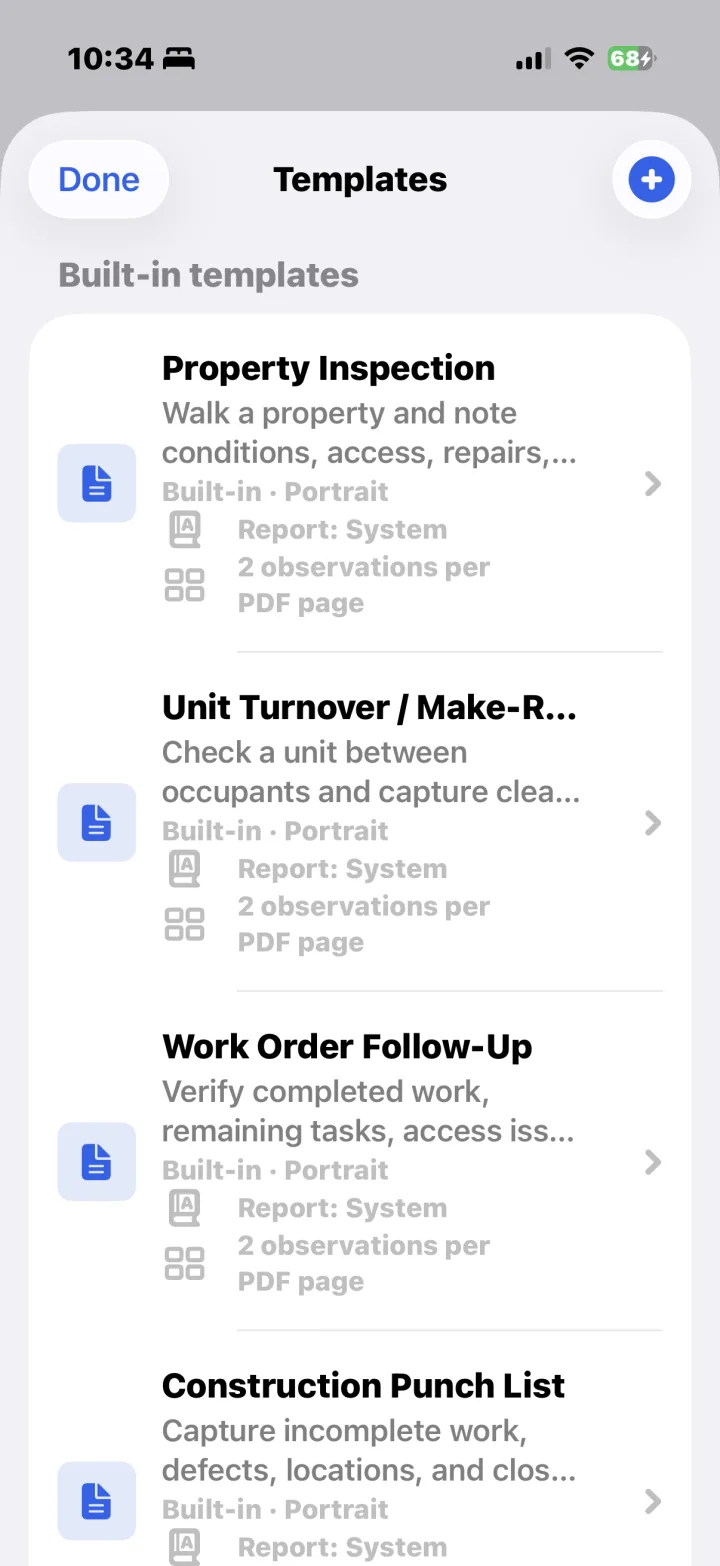
Templates for property work
Pick the template that matches the walk. Use Unit Turnover / Make-Ready between occupants, and Work Order Follow-Up to confirm that a repair was done. In a company (Enterprise) workspace, the app shows the templates your company has approved.
Property Inspection
Walk a property and note conditions, access, repairs, and follow-up.
Unit Turnover / Make-Ready
Check a unit between occupants and capture cleaning, damage, and repair needs.
Work Order Follow-Up
Verify completed work, remaining tasks, access issues, and tenant notes.
Damage / Claim Assessment
Capture damage, likely cause, affected areas, and repair priority.
Every observation, organized
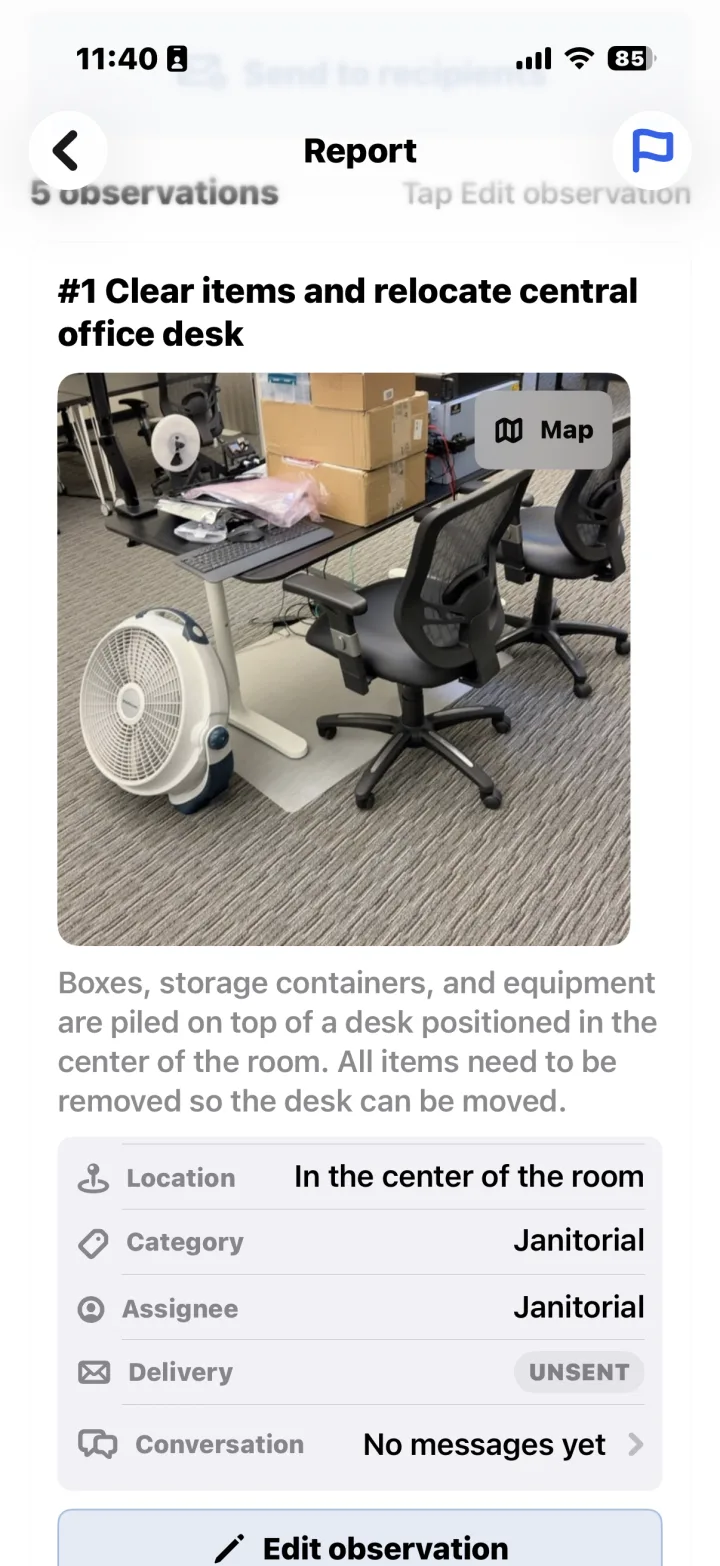
Each observation in the report has its photo, an auto-written description, and its location, category and assignee, so the follow-up is clear.
- A photo and an auto-written description for each finding
- Location, category and assignee on every observation
- Severity and action items in the findings list
- A route map with numbered photo pins
Send follow-ups to the right people
Select the observations that need action and send them to the right recipients. Each one shows its category and whether it has been sent. Prepare the full inspection report as a PDF or a DOCX file for the owner, the client or your records, or share a link that expires after 60 days.
Use Report6 on your own in a Personal workspace, or as part of your company's Enterprise workspace. In a company workspace, the company controls access to the workspace and the reports submitted there, and your team reviews reports, recipients, templates and assignments at enterprise.report6.ai.
Personal reports live on your phone. You have 30 days to make changes; then the report finalizes, and the recording, unused photos, full location trace and processing data behind it are deleted from the cloud. See the App Privacy Policy.
FAQ
Property inspection questions
Does it handle unit turnovers?
Yes. The Unit Turnover / Make-Ready template is built for checking a unit between occupants and capturing cleaning, damage and repair needs.
Do I need to set up a checklist first?
No. Pick a built-in template, or choose Free-form and talk through the walk. Report6 organizes your narration into findings and follow-ups. In a company (Enterprise) workspace, the app shows the templates your company has approved.
Which phones does it run on?
Report6 is on the App Store for iPhone in the US, Canada, the UK, Australia and New Zealand, and on Google Play for Android. No other hardware is needed.
More ways to use Report6: site walk reports and construction punch lists.
Walk the unit. Talk. Done.
Get Report6 on iPhone or Android and finish your next property inspection report before you're back in the office.
Report 6 is built and operated by Patrol 6, Inc.