
Site walk & site visit reports
Site walk report app: walk the site, talk, get the report
Report6 turns a narrated walkthrough into a finished site visit report, with photos, findings, a route map and action items, on your iPhone or Android phone.


Available now on the App Store and Google Play · No checklist to fill out
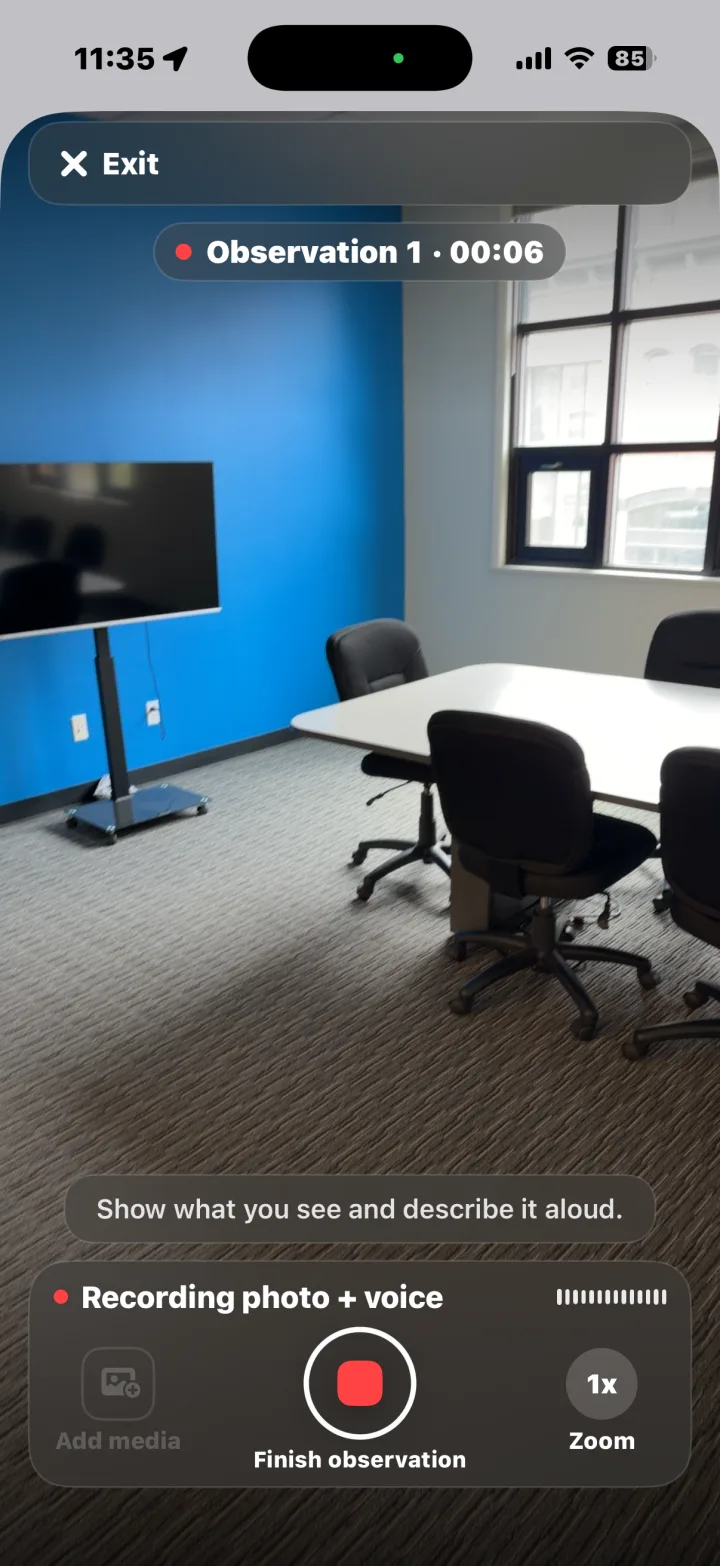
The walk is quick. The write-up shouldn't take all evening.
A site walk usually ends with the slow part: typing up notes, matching photos to each finding, writing captions and formatting a report someone will actually read. Report6 moves that work onto the walk itself. You talk through what you see, and the site visit report is built from your narration, your photos and your location.
It works for any walk you would normally write up: a building or facility walkthrough, a safety check, an incident, a vehicle or equipment walkaround, or a damage assessment. The phone is the camera, the microphone and the GPS, so there is nothing else to carry.
How it works
From site walk to site visit report in three steps
-
1
Walk
Start a report and record an observation. The app captures a photo every second and logs your GPS path as you move.
-
2
Talk
Say what you see, the way you would tell a colleague. Report6 transcribes your narration and pulls out the findings, severity and action items.
-
3
Done
Finish the walk and the report is waiting: a photo-mapped PDF you can review, edit and share before you leave the parking lot.
What's in the site visit report
Every report follows the same clean layout, so clients and colleagues know where to look.
- A cover with the site's location and street address
- A summary and a route map with numbered photo pins
- Findings with severity and action items
- A time-stamped, captioned photo log
See it for yourself: download the illustrative sample report (PDF), a fictional office building walkthrough with AI-generated photos in the Report6 report layout.
Templates for site walks
Start from a built-in template so the report is organized the way your walk is, or choose Free-form and just walk and talk. In a company (Enterprise) workspace, the app shows the templates your company has approved.
General Site Walkthrough
A free-form walk and talk.
Safety / Hazard Inspection
Identify hazards, housekeeping issues, protective measures, and urgency.
Incident Report
Document what happened, when, and where.
Vehicle / Equipment Walkaround
Inspect a vehicle or piece of equipment.
Damage / Claim Assessment
Capture damage, likely cause, affected areas, and repair priority.
Utility Line Patrol
Walk poles, lines, meters, or roadside assets and note defects or hazards.
Review, share and hand off
Open the report to review the findings and fix anything the narration missed. When it's right, prepare a PDF or a DOCX file, or share a link. Shared links expire after 60 days, and you can send a new one any time. You can also send observations to the people who need to act on them, each with its category and assignee.
Personal reports live on your phone. You have 30 days to make changes; then the report finalizes, and the recording, unused photos, full location trace and processing data behind it are deleted from the cloud. Read the details in the App Privacy Policy.
FAQ
Site walk report questions
What is a site walk report?
A site walk report, or site visit report, records what you found on a walk through a site: the conditions you saw, a photo of each finding, where it was, and what needs to happen next. Report6 builds it from your narration and photos.
Does it work on iPhone and Android?
Yes. Report6 is on the App Store for iPhone in the US, Canada, the UK, Australia and New Zealand, and on Google Play for Android.
Can my company use it?
Yes. Companies use a Report6 Enterprise workspace and review reports at enterprise.report6.ai. For an Enterprise login, contact sales@patrol6.com.
More ways to use Report6: property inspections and construction punch lists.
Walk the site. Talk. Done.
Get Report6 on iPhone or Android and send your next site visit report before you're back in the office.
Report 6 is built and operated by Patrol 6, Inc.